● Native for macOS 14+ · Apple silicon & Intel · 7-day free trial

Your Mac is full.
Here's exactly why.

DiskScout maps your disk six different ways and tells you what each folder is and whether it's safe to delete. Cleanup goes Trash-first, with in-app restore until you empty the Trash.

Buy DiskScout · $19 once Download free trial ↓ DMG · 2.8 MB · No account · No subscription · Nothing ever uploaded
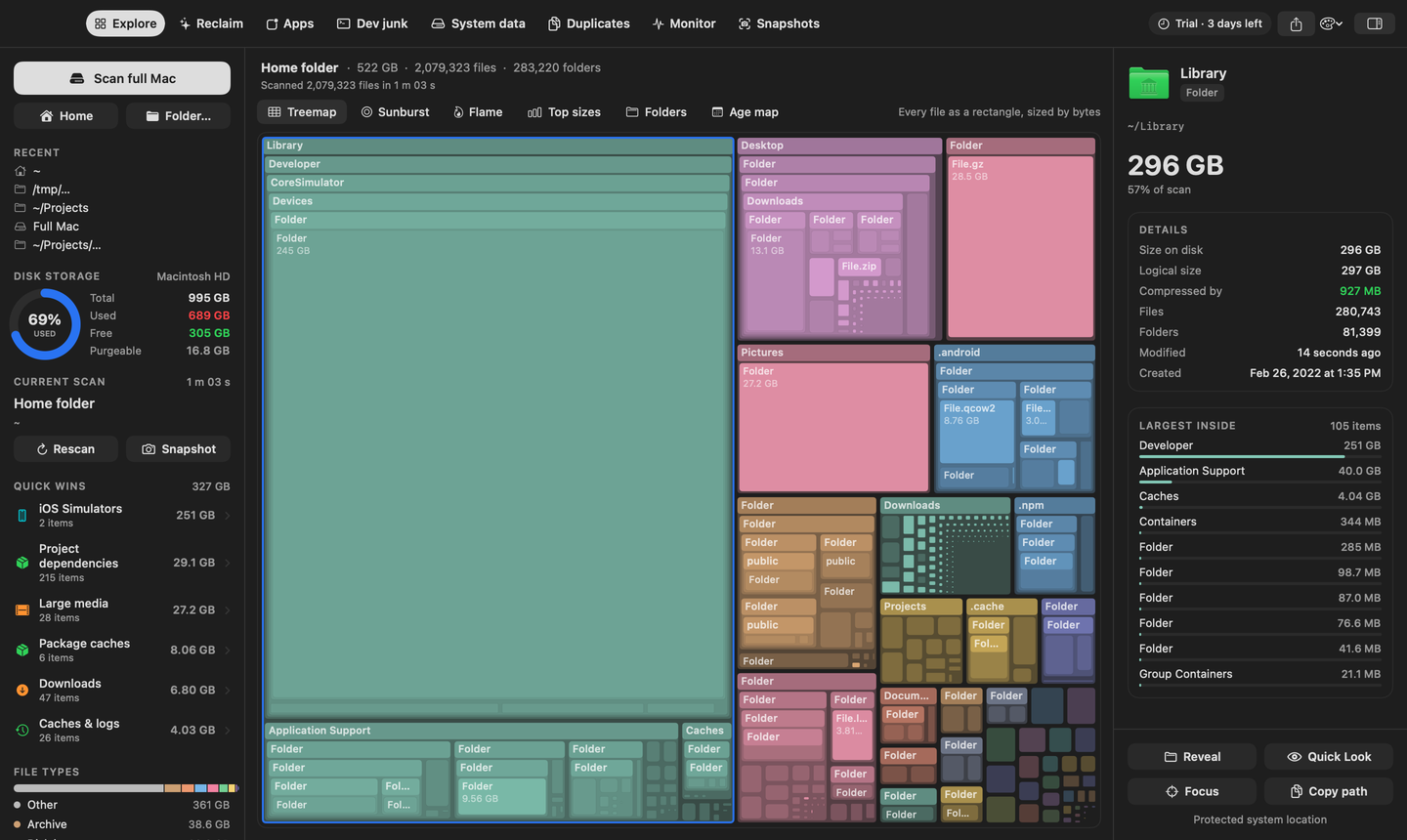
DiskScout treemap of a Mac home folder

Every file as a rectangle, sized by bytes. Hover for size and safety, double-click to dive in.

One scanto map your folders and find the largest files
140+folders explained in plain English, each with a safety grade
6ways to look at one scan – switching is instant
0 bytesleave your Mac. No account, no analytics, no uploads
Why it's different

Other disk apps show you a big coloured block. DiskScout tells you what it is.

Knowing that ~/Library/Developer is 40 GB is not the same as knowing whether you can delete it. DiskScout closes that gap on every click.

📖

Explains every folder

DerivedData, CoreSimulator, Docker.raw, MobileSync backups, Ollama models, CloudKit caches… 140+ known paths get a plain-English “what is this” and a “what happens if I delete it”.

Safe · Probably safe · Careful · System
✨

Reclaim plan

The moment a scan lands you get a ranked plan: biggest wins first, sorted by safety. Stage what you agree with, clean once.

One click per win
⌘

Dev Junk with stale detection

Every node_modules, .venv, target/, Pods and .next is grouped by project and dated by the newest source file. Untouched 60 days? Reclaim it, and DiskScout shows the command to restore it.

Built for developers
🧩

“System Data”, decoded

The mystery bar in macOS Storage settings, split into snapshots, swap, caches, logs, iPhone backups and Docker, each with an action. Thin Time Machine local snapshots from inside the app.

The #1 Mac storage question
☁️

Offload to iCloud, don't delete

Finds fully-downloaded iCloud Drive files and evicts the local copy. Space comes back, files stay in iCloud and re-download on open.

Nobody else does this
↩︎

Trash-first, with undo

File cleanup moves items to the Trash and keeps a history. Restore puts them back before the Trash is emptied. Empty Trash, iCloud offload and snapshot thinning are separate, clearly labelled actions.

Sleep well
What it does

One scan. Everything you need to get the space back.

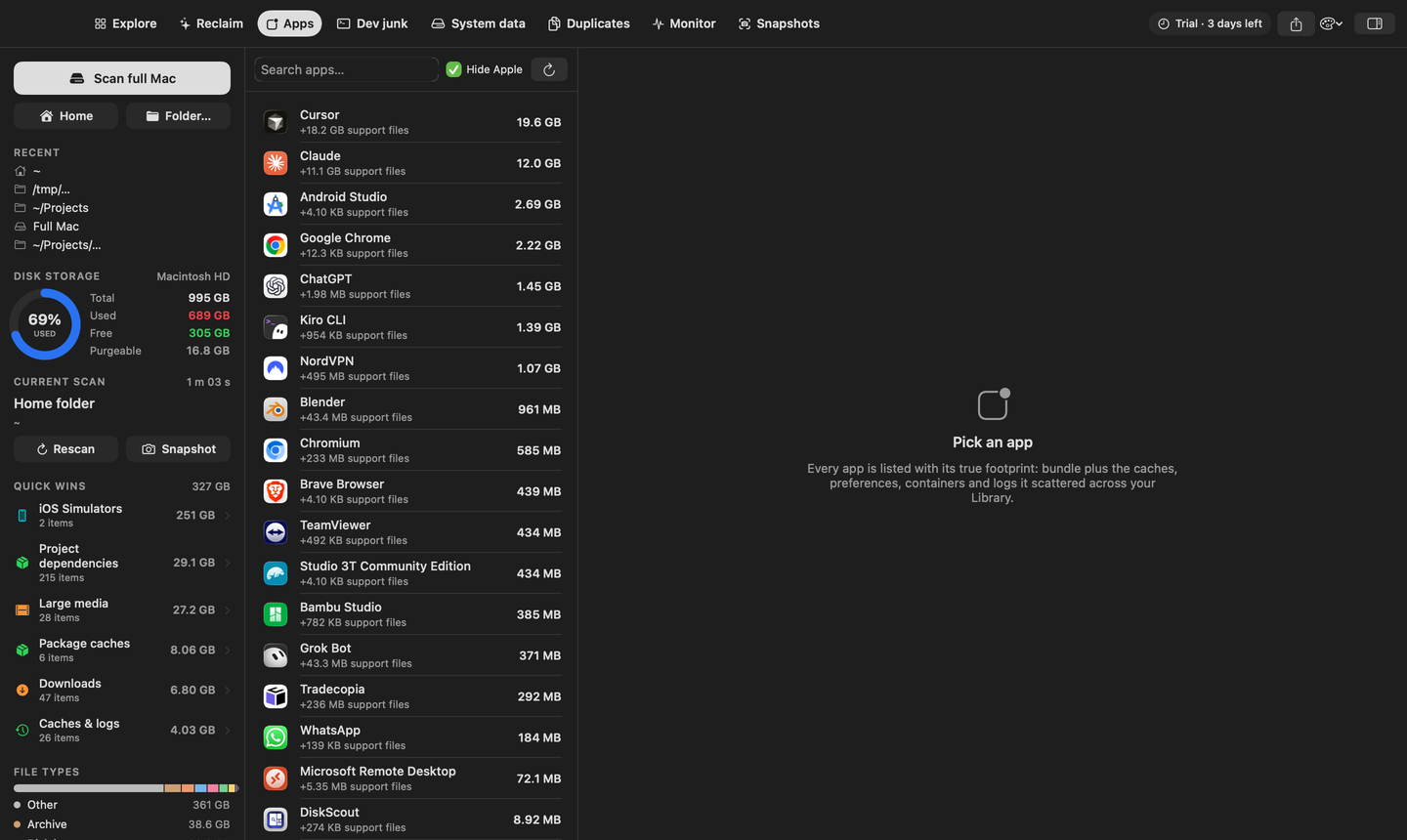
Uninstall apps and their leftovers

Every app is listed with its true footprint: bundle plus the caches, preferences, containers, HTTP storage and logs it scattered across your Library. Uninstall Completely takes the whole set, and tells you when you last used the app.

  • Last-used date from Spotlight
  • Leftovers matched by bundle ID, not guesswork
  • Root-owned apps handled with one admin prompt
Applications tab with leftovers

Six views of the same scan

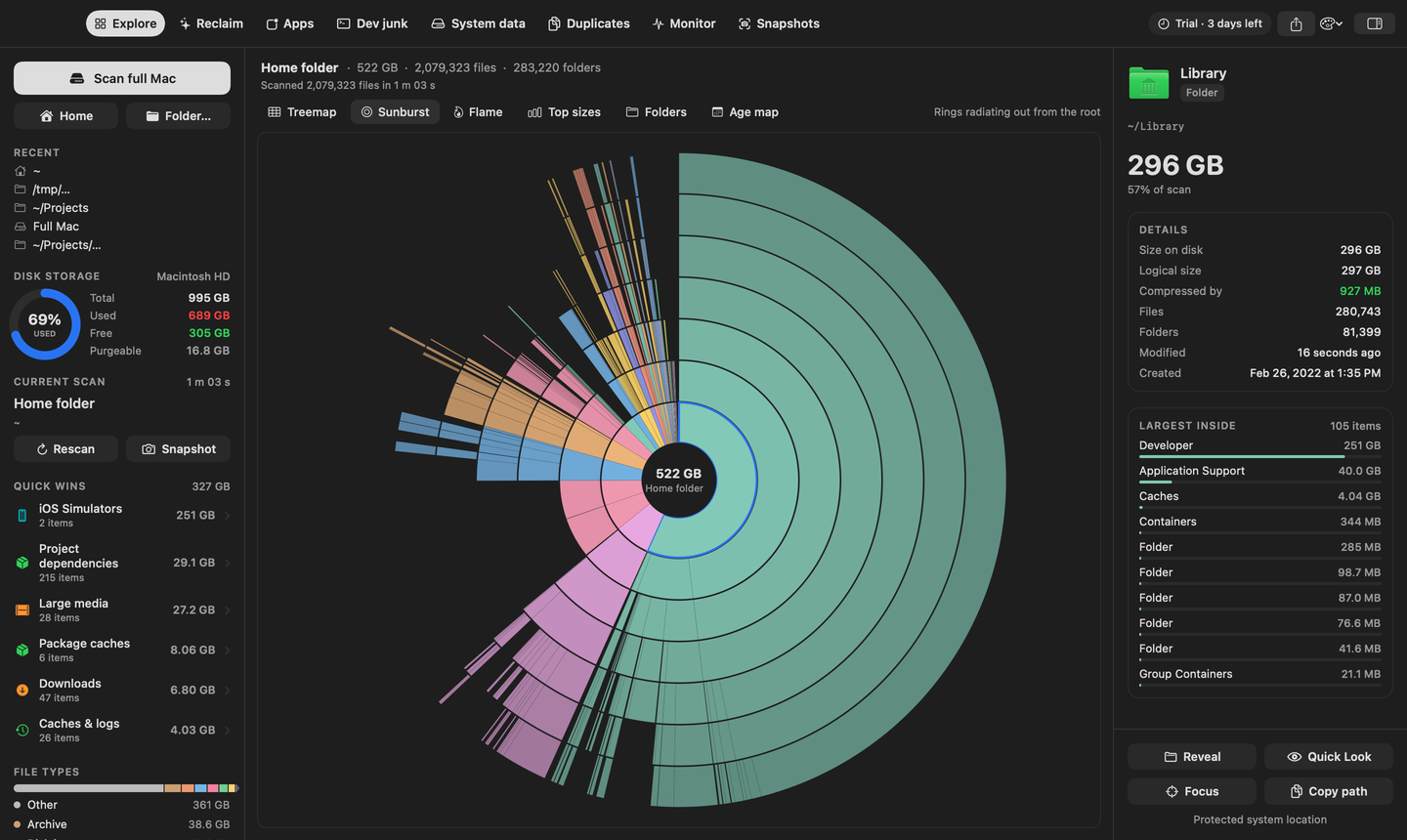
Some people find the big folder by area, some by ranking, some by date. Treemap, Sunburst, Flame, Top Sizes, Folders and Age Map all read from one scan, so switching is instant.

  • Colour by folder, type, age or safety
  • Hover tooltips with size and safety grade
  • Double-click to re-root anywhere
Sunburst view

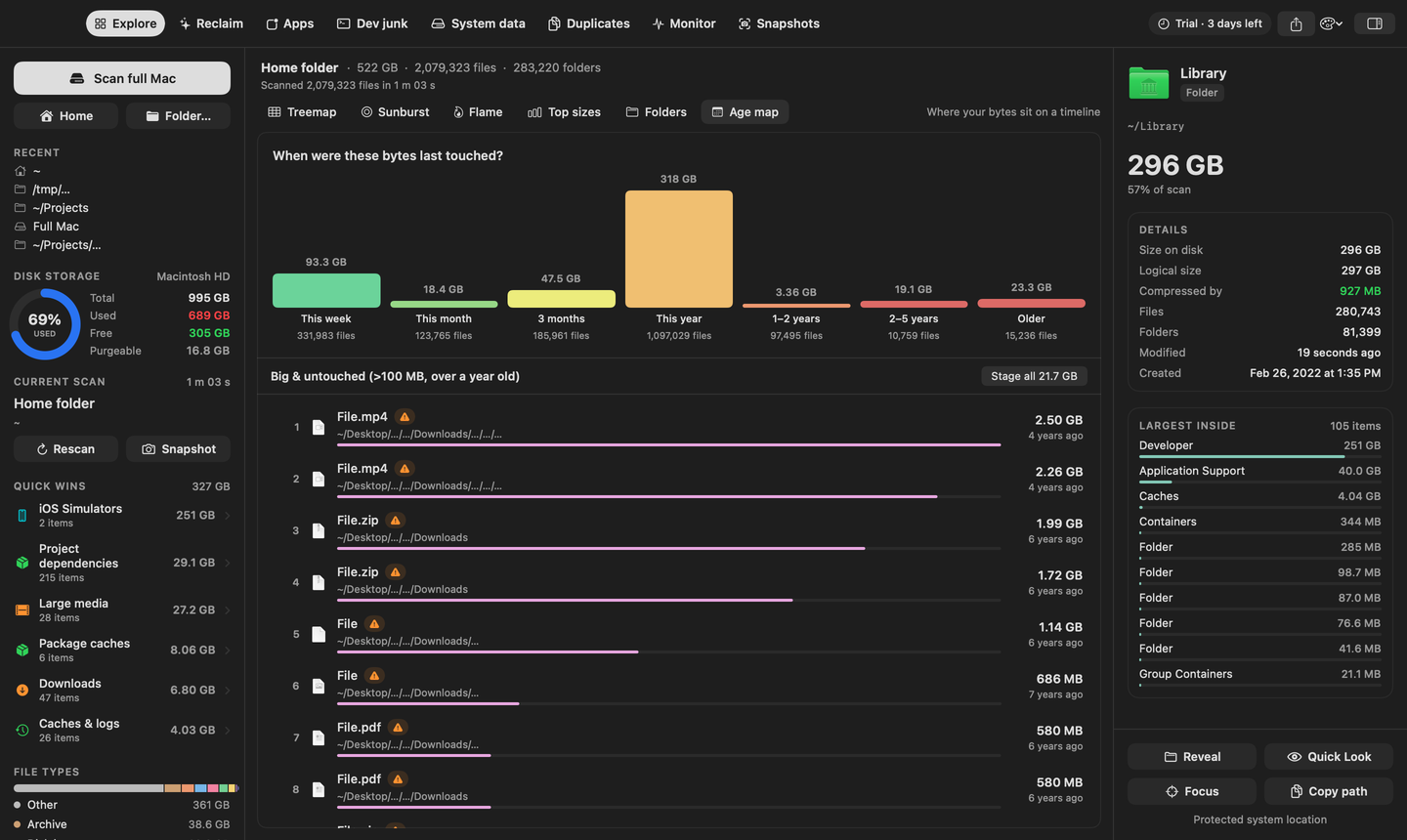
Age Map: find what's old, not just what's big

Bytes split by last-modified date, and a Big & Untouched list of files over 100 MB nobody has opened in a year. Stage the whole set with one click.

Age map view

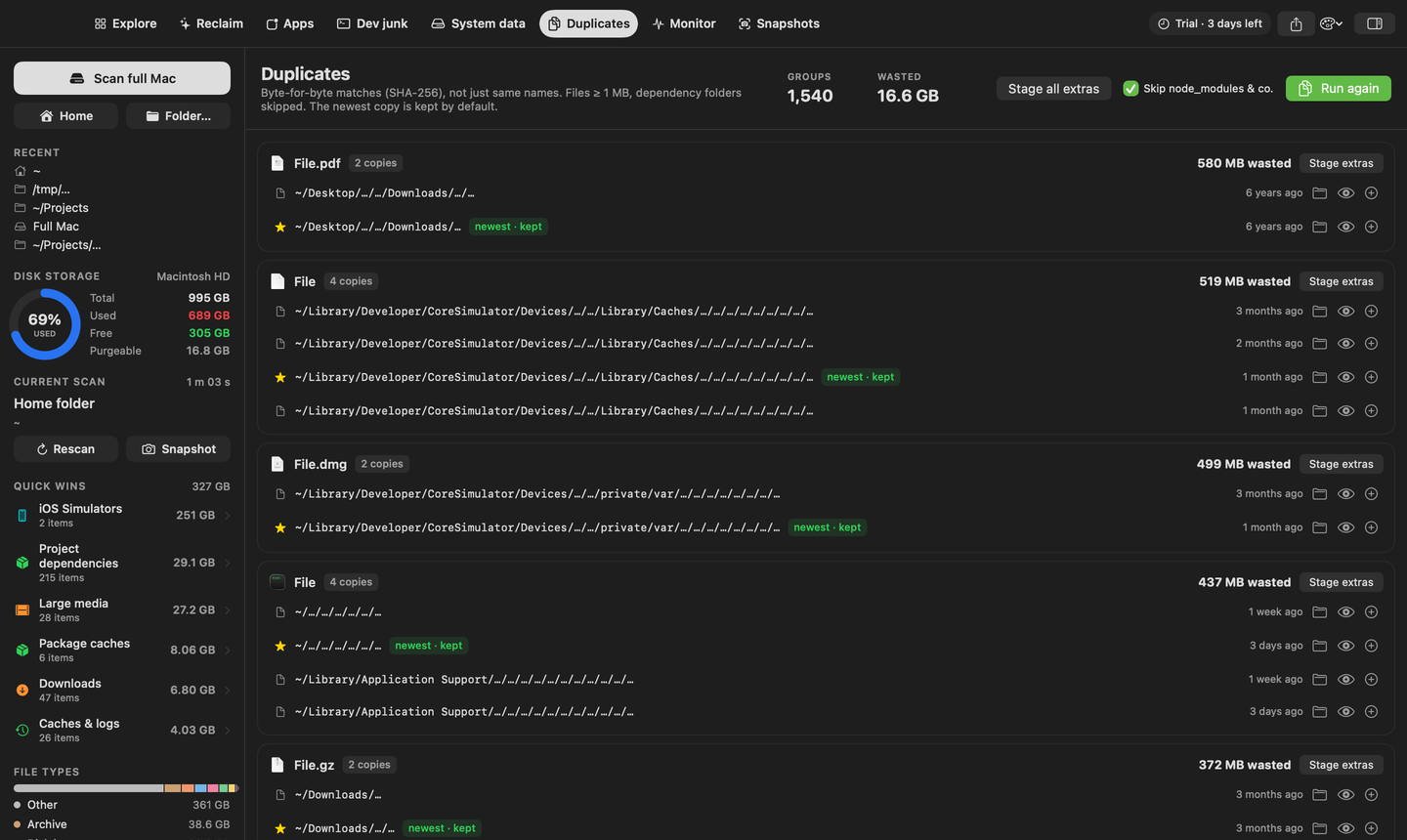
Duplicates by content, installers you already installed

Byte-for-byte SHA-256 matching (size buckets, then sample, then full hash, so it's fast). Plus a list of DMGs and PKGs in Downloads whose app is already in /Applications.

Duplicates

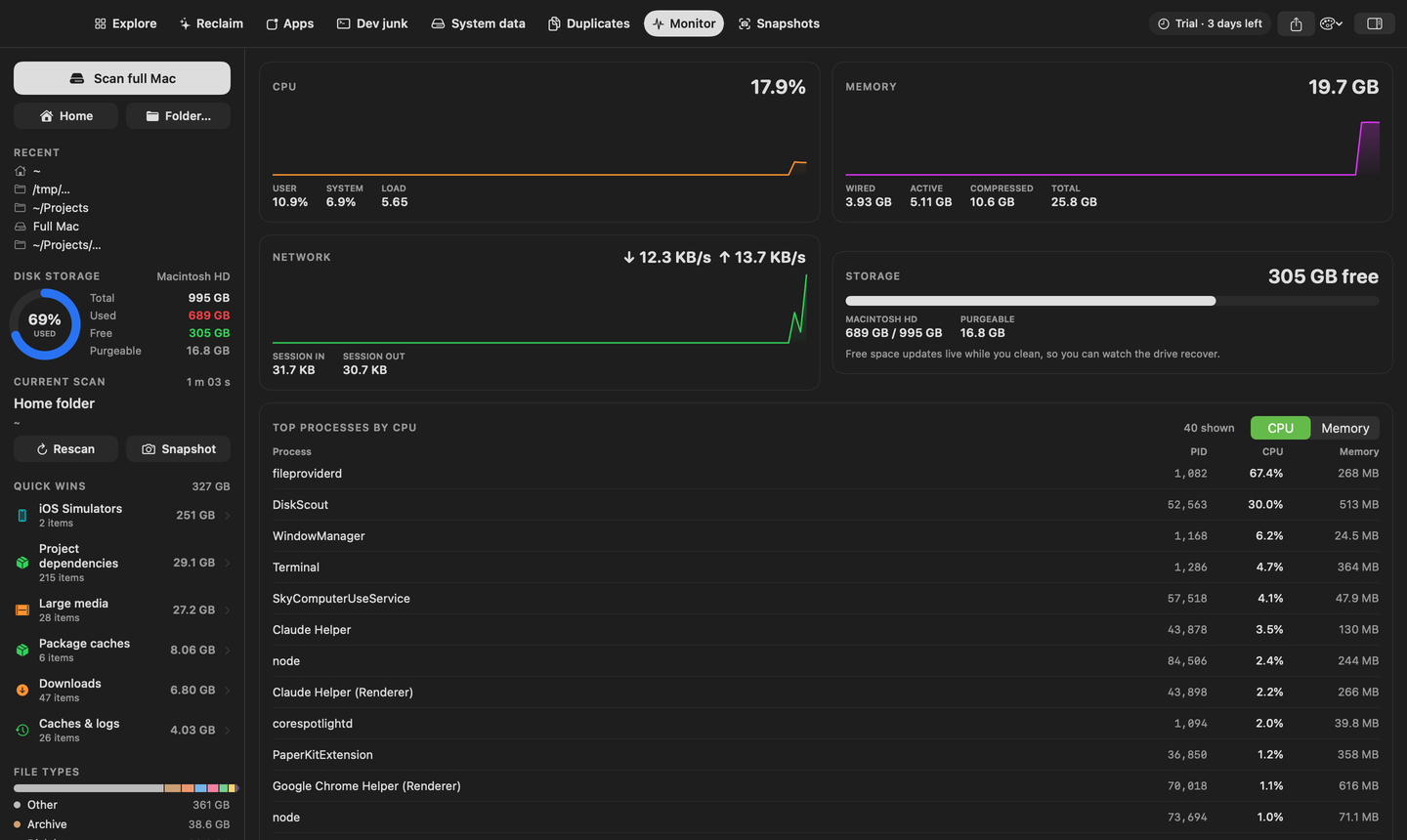
Live monitor and snapshots

Watch free space recover while you clean. CPU, memory, network and the processes doing the work, ranked. Save a snapshot today, compare next month, and see exactly which folder grew.

Monitor

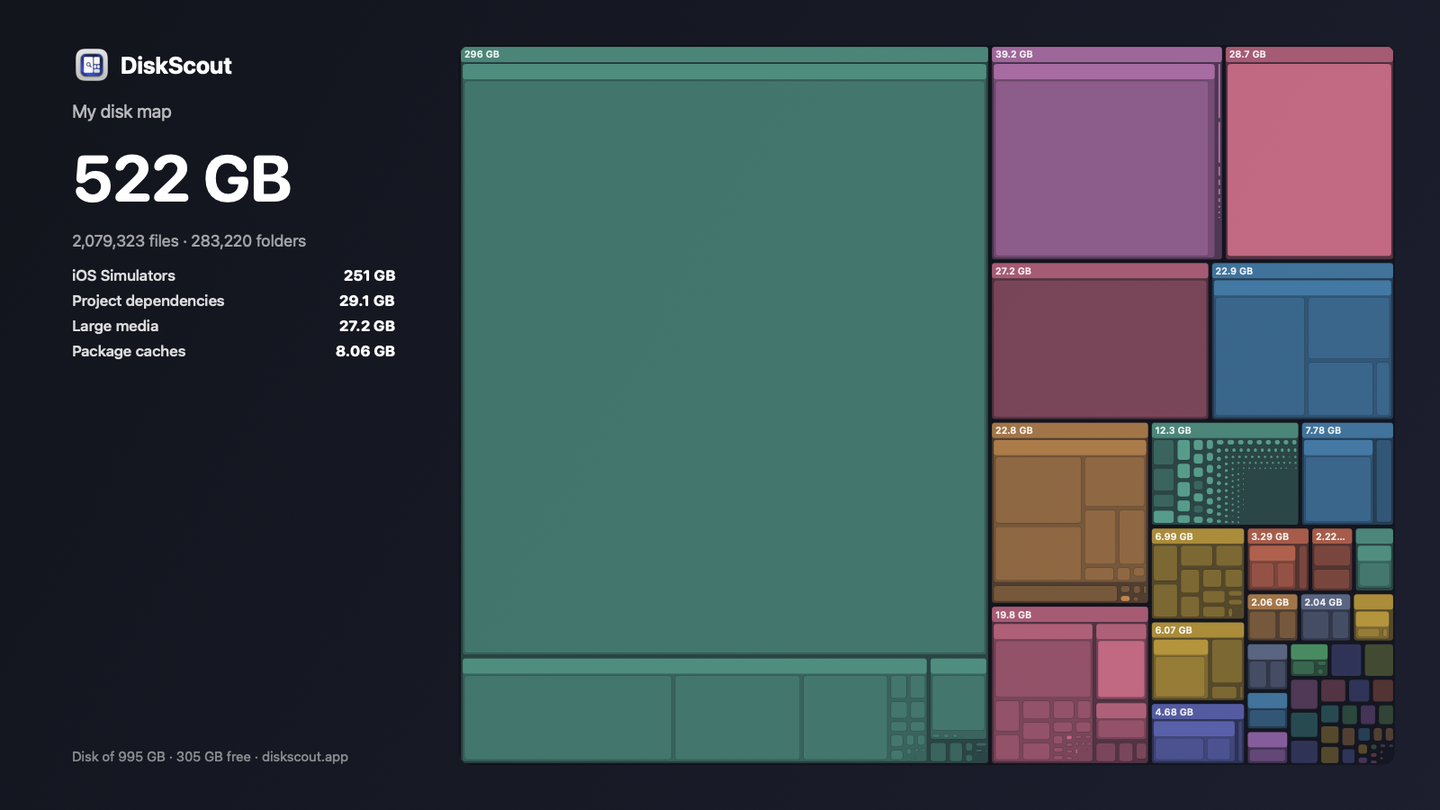
Share your disk map

One click renders a clean 1600×900 card of your scan, folder names blurred if you like, ready to post. Compare notes with friends on what's eating their Macs.

Share card
Compare

Where DiskScout sits

The visual analyzers show size. The cleaners want a subscription. DiskScout is the one that explains, and it's bought once.

DiskScoutDaisyDiskGrandPerspectiveCleanMyMac
Treemap / sunburst visualisation✓ 6 views✓✓partial
Plain-English explanation of each folder✓ 140+——categories
Safety grade before you delete✓——partial
Dev junk by project, with stale detection✓———
“System Data” breakdown + snapshot thinning✓——partial
iCloud offload instead of delete✓———
App uninstaller with leftovers✓——✓
Trash-first with in-app restore✓TrashTrashpartial
Works fully offline, no account✓✓✓account
Price$19 once~$10 onceFreesubscription-first

Feature notes from public product pages as of September 2026. If anything here is out of date, email us and we'll fix it.

Pricing

Buy it once. Keep it.

No subscription, no account, no upsell inside the app. One payment, one Mac at a time, move it whenever you like.

$14First 50 · Sold out
$19Next 200 · 200 left
YOU ARE HERE
DiskScout for Mac · Launch price
$19one-time · USD · VAT handled at checkout
  • All six visualisations, nothing held back
  • Reclaim plan, Dev Junk, System Data decoder, iCloud offload
  • Duplicate finder and complete app uninstaller
  • Snapshots, live monitor, share card, menu-bar free-space
  • Every 1.x update, free
  • One Mac at a time · deactivate and move any time
Buy Personal · $19 Not sure yet? Download and try everything free for 7 days. Need more than one Mac? See Family and Team plans.

Payments, VAT and invoices are handled by Dodo Payments (cards, Apple Pay, Google Pay, PayPal, UPI). Your licence key shows on screen right after checkout and arrives by email.

FAQ

Quick answers

What does DiskScout actually do?

It scans a drive or folder and maps every byte, then gives you six ways to look at the result. Click anything and the inspector tells you what it is, whether it's safe to delete, how much APFS compression is saving you, and the ten largest things inside. Stage items for cleanup, review the list, and move them to the Trash in one go.

How is this different from DaisyDisk or GrandPerspective?

Those show you size. DiskScout also tells you meaning: 140+ known folders get a plain-English explanation and a safety grade, developer junk is grouped by project and dated, “System Data” is decoded into actionable pieces, and iCloud files can be offloaded instead of deleted. Everything goes to the Trash first with an in-app Restore.

How fast is a scan?

Scan time depends on file count, storage and macOS permissions. Scanning runs in parallel, and all six views share one in-memory tree. The app shows the measured file count and elapsed time after each scan.

Does anything leave my Mac?

No. Scanning, hashing and duplicate matching all happen locally. There is no account, no sync, no analytics. The only network calls are a licence check with Dodo Payments and an optional update check you can turn off.

Can it delete something I still need?

Not on its own. Items go to a staged list you review first; system-critical paths cannot be staged at all; and cleanup moves things to the Trash rather than deleting. The Reclaim tab keeps a history with a Restore button.

Do I need Full Disk Access?

Without it, macOS hides Mail, Messages, Safari and a few Library folders, so totals come out low. DiskScout shows a banner with a one-click link to the right System Settings pane. It is optional.

How many Macs does one key cover?

One at a time. Moving to a new Mac: open Settings on the old one, choose Deactivate This Mac, and the key is free to activate elsewhere.

Does it need to be online?

Only to activate. After that, DiskScout re-checks the key in the background when it can, and keeps working for two weeks without any connection.

Intel Macs?

Yes. The app ships as a universal binary for Apple silicon and Intel, macOS 14 Sonoma or later.

I lost my key.

Email support@piplistudio.com from the address you bought with and we'll resend it.
Find out where
your disk actually went.

One scan, and the folder quietly holding thirty gigabytes stops being a mystery.

Buy DiskScout · $19 once Download free trial ↓ macOS 14 or later · Apple silicon & Intel · nothing ever uploaded